Automatic Migration
 skovhus/jest-codemods: Codemods for migrating to Jest
Instead of going through the entire Jest documentation to find out what the differences are between Jasmine and Jest, I just used jest-codemods followed by a git diff.
I can be so efficient sometimes.
npx jest-codemods --help
npx jest-codemods .
Configuration
Create a jest.config.ts:
npx jest --init
In Jasmine there was spec/helpers, now the entry point for global configuration is in jest.config.ts.
// A list of paths to modules that run some code to configure
// or set up the testing framework before each test
setupFilesAfterEnv: ["./setupJest.js"],
Example setupJest.js:
// Set a global variable
global.__DEV__ = true;

// Or a global function
global.t = t => t;

// Custom equality tester
// Return undefined if you want to give other testers a chance
const reInventToBe = (a, b) => a === b;
expect.addEqualityTesters([reInventToBe]);

// Custom matchers
expect.extend({ yourMatcher });
Custom Matchers
Use expect.extend instead of jasmine.addMatchers.
The return type of a custom matcher is slightly different in Jest: The message type changes from string to () => string.
expect.extend({
  yourMatcher(actual, expected, y, z) {
    return {
      pass: true,
      message: () => {
        const prettyActual = this.utils.printReceived(actual);
        const prettyExpected = this.utils.printExpected(expected);
        return `${prettyActual} is not something by ${prettyExpected}`;
      },
    };
  },
});

// Usage
expect(100).yourMatcher(99, 'param-y', 'param-z');
The Differences
- In Jest
test is an alias for it.
jasmine.xxx matchers typically translate directly to expect.xxx.
- Ex:
jasmine.arrayContaining –> expect.arrayContaining.
- Jasmine has some (pretty useless) without equivalent in Jest.
- But Jest has bunches more than Jasmine…
- Jest has test.each to run an array of inputs
Spies
There are some differences in syntax when using spies, most is solved automatically by the code-mod. Jest offers a cleaner API with additional functionality.
But a big difference here is that while Jasmine does not execute the original implementation, Jest DOES.
// Setting up the Spy
const mataHari = {
  setBar(value, times) {return value * times;}
};

// The same behavior in Jasmine: spyOn(x, y).and.callThrough()
const spie = jest.spyOn(mataHari, 'setBar');


// If you want to mimick Jasmine behavior of NOT calling the original impl:
// In this case it doesn't matter much because there are no side effects
// If you are mocking an API call, you may want the Jasmine behavior instead!
// jest.spyOn(mataHari, 'setBar').mockImplementation(() => 0);


// Making calls
mataHari.setBar(1);
mataHari.setBar(2, 10);

// Inspecting calls
expect(mataHari.setBar.mock.calls[0][0]).toBe(1);
expect(mataHari.setBar.mock.calls[1][0]).toBe(2);
expect(mataHari.setBar.mock.calls[1][1]).toBe(10);
expect(mataHari.setBar.mock.lastCall[1]).toBe(10);

// Inspecting call returns
expect(mataHari.setBar.mock.results).toHaveLength(2);
expect(mataHari.setBar.mock.results[1].type).toBe('return'); // or 'throw'
expect(mataHari.setBar.mock.results[1].value).toBe(20); // == 2 * 10

// Clearing calls, results, ...
expect(mataHari.setBar.mock.calls).toHaveLength(2);
spie.mockClear();
expect(mataHari.setBar.mock.calls).toHaveLength(0);

// Also remove any mockReturnValue etc
spie.mockReset();

// In an afterEach or something
jest.restoreAllMocks();
proxyquire –> Mocks
Replace the api.js dependency in cut.js:
const apiStub = {};

// proxyquire
const proxyquire = require('proxyquire');
const cut = proxyquire('./cut.js', {'./api.js': apiStub});

// Jest
jest.mock('./api.js', () => apiStub);
const cut = require('./cut.js');
So the proxyquire package is not needed in Jest. Jest mocks are also much more versatile…
Async
Jasmine has done.fail(err). This has been simplified to just done(err) in Jest.
const pie = Promise.resolve(3.14);

// Jasmine
await expectAsync(pie).toBeResolvedTo(3.14);

// Jest
return expect(pie).resolves.toBe(3.14);

// Jest: Setting up mock Promises
const p1 = jest.fn().mockResolvedValue(1);
const p2 = jest.fn().mockRejectedValue(err);
// is shorthand for
const p1 = jest.fn().mockImplementation(() => Promise.resolve(1));
TL;DR – Differences Table
The tl;dr version:
| Jasmine |
Jest |
Remarks |
| Matchers |
|
|
| toMatch(‘\sbar’) |
toMatch(/sbar/) |
|
| toContain(partialObj) |
toContainEqual(partialObj) |
Or toMatchObject() |
| withContext |
Extra describe() |
|
| toThrowMatching |
toThrowError(/regex/) |
|
|
|
|
| Spies |
|
|
| jasmine.createSpy(‘n’) |
jest.fn() |
+ mockName(‘n’) and getMockName() |
| jasmine.createSpyObj(‘n’, [‘f1’, ‘f2’]) |
({ f1: jest.fn(), f2: jest.fn() }) |
With f1, f2 being the functions |
| jasmine.createSpyObj(‘n’, {f: 1}) |
({ f: jest.fn(() => 1)}) |
|
| spyOn |
jest.spyOn |
spyOn is a global in Jasmine |
| spyOnProperty(obj, ‘prop’, ‘get’) |
jest.spyOn(obj, ‘prop’, ‘get’) |
With ‘prop’ the property name and the third parameter ‘get’ or ‘set’ |
| .calls |
.mock.calls |
Ex: obj.prop.mock.calls |
| .calls.any() / .count() |
.mock.calls.length |
|
| .calls.mostRecent |
.mock.lastCall |
|
| .calls.reset() |
.mockClear() |
In Jest this is on the mock object itself, not on .calls |
| .and.callFake(fn) |
.mockImplementation(fn) |
|
| .and.returnValue(1) |
.mockReturnValue(2) |
Ex: jest.spyOn(obj, ‘prop’).mockReturnValue(2); |
| .and.returnValues(1, 2) |
.mockReturnValueOnce(1) .mockReturnValueOnce(2) |
|
| .and.throwError(err) |
.mockImplementation(() => {throw err}) |
|
|
|
|
| Async |
|
|
| expectAsync |
resolves/rejects |
Ex: expect(promise).resolves.toBe(true) |
| toBeResolvedTo |
.resolves.toBe |
|
| toBeRejectedWith |
.rejects.toMatch |
|
|
|
|
| Time Travel |
|
Manipulate new Date() |
| jasmine.clock().install() |
jest.useFakeTimers() |
|
| jasmine.clock().tick(1) |
jest.advanceTimersByTime(1) |
Also: advanceTimersByTimeAsync |
| jasmine.clock().mockDate(d) |
jest.setSystemTime(d) |
|
| jasmine.clock().uninstall() |
jest.useRealTimers() |
|
| ??? |
jest.runAllTimersAsync() |
Also: runOnlyPendingTimers, advanceTimersToNextTimer, … |
| Other |
|
|
| jasmine.addMatchers |
expect.extend |
|
| addCustomEqualityTester(t) |
addEqualityTesters([t]) |
Jasmine: 1 tester, Jest: Array of tester(s)! |
| proxyquire |
jest.mock |
|
VSCode Integration
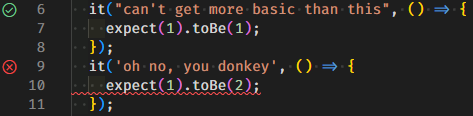
Jest works out of the box when using create-react-app! (link contains the VSCode launch.json) after installing the Jest VSCode Extension:
 jest-community/vscode-jest: The optimal flow for Jest based testing in VS Code
How it looks:
Notifications?
Set notify: true in jest.config.ts.
npm install -S node-notifier
And get that dopamine shot every time it says 0 tests failed 😃
Conclusions
Key points:
- If you have an existing code base, use
jest-codemods.
- The matcher syntax is almost 100% identical.
- Timers syntax
jasmine.clock vs jest.useFakeTimers
- It’s a completely different API
- But it’s converted 100% by the code-mod
- Jest offers more control over timers
- Spies: A slightly different API, also code-modded for you!
- proxyquire is built in with
jest.mock
Next up, the real reason to switch to Jest: React Component testing.
Well aside of, you know, the very nice VSCode integration which works out of the box with create-react-app.
Also note that today is truly the perfect day to publish a “Jest” article!